Author Archives: shringtech

Zoom wants to be the new Teams

Zoom wants to be the new Teams

You think Zoom, you think video calls. For millions around the world, it’s a tool they rely on at work every day.

But for productivity, collaboration and workplace integration (as well as video calls), it’s Microsoft Teams that’s leading the way. Its tight integration with other Microsoft 365 services makes it so easy.

Now Zoom is looking for a piece of that action with the launch of a whole suite of features and services. They’re clearly designed to take on Teams and Slack head-to-head.

These will include email, a calendar app, and a virtual co-working space called Zoom Spots. Meanwhile a bunch of upgrades to the Zoom One platform are aiming to improve collaboration, keep chats flowing, and keep projects moving.

While it feels like a logical step for the video conferencing giant, it remains to be seen how widely adopted the new services will be. And before we recommend it to our clients, we’ll want to know that the levels of support, reliability and security are all bulletproof.

Many businesses are already committed to Microsoft Teams, which releases its own improvements almost on a weekly basis. But this is an interesting new development and we’ll be watching what happens carefully.

If you want to know more about the best tools to keep your team working smoothly together, just get in touch.

Published with permission from Your Tech Updates.

Why you will not be fine on this Cloud9

Why you will not be fine on this Cloud9

We go to a lot of effort working to protect our clients from online security threats. These could come in the form of key loggers that record you as you enter your login information, or DDoS (Distributed Denial of Service) attacks, which overwhelm a service with fake traffic, causing it to crash.

As part of our service, we always advise our clients to install software updates as soon as they become available, and support them through the process where they need help.

But if you visit a website that asks you to install an Adobe Flash update… STOP!

Flash itself was actually discontinued in 2020 and is no longer supported, so you should assume that any Flash update messages will be a security threat.

Currently, fake Flash messages are being used as a cover for a new ‘botnet’ campaign that installs a malicious browser extension, called Cloud9. If you use Google Chrome or Microsoft Edge you could be a target.

A botnet forms a group of infected devices that are controlled as one, without the owners’ knowledge, stealing sensitive data, sending spam, or performing DDoS attacks.

Worse still, the Cloud9 botnet will attempt to install additional malware to your device or network if it’s not stopped in time.

This type of attack is hard to spot because it looks like a genuine request, and just about anyone can become a target.

But there are things you can do to protect your business.

First, make everyone aware of the threat. If your people know what to look out for it’s less likely they’ll install the update in the first place.

Next, make sure everyone’s running the latest version of their browser and that security software is up to date.

Finally, enable Enhanced Protection in your browser’s Privacy and Security settings. This will give you a warning if you stumble upon a risky website or download.

We can help you keep your business protected from cyber criminals. Just get in touch.

Published with permission from Your Tech Updates.

Are you losing hours each week setting up video calls?

Are you losing hours each week setting up video calls?

You could be losing a full-time working week for every member of your team, thanks to the hassle of setting up video calls.

Video conferencing has revolutionized team meetings, and saves a huge amount of travel time. But we’re still not getting the full benefit from the new technology, according to new research.

Employees aged between 18 and 24 take up to 10 minutes to get set up for each remote meeting.

Times that by a typical five meetings a week, and it’s suddenly lost you 40 hours every year. That’s a whole working week of wasted time – a figure that gets even higher when you look at older age brackets.

It isn’t necessarily a result of differing technological know-how. The research shows that employees blame the tech itself for the loss of productivity.

Almost a third of people said they didn’t have the right tools for the job, and 23% even said they felt excluded from remote meetings thanks to inadequate tech.

Employees often feel that the audio-visual (AV) technology they’re provided for remote and hybrid working simply isn’t up to the job. That means poor microphones that don’t play ball, jittery webcams that interfere with communication, or the wrong choice of video calling software. All that makes meetings harder to set up and causes them to take longer than they should.

Despite this, businesses that offer remote and hybrid working are reaping the rewards in many other areas, including staff engagement and performance.

But there is a solution.

Assess your employees’ AV technology to make sure their tools are not slowing them down – new webcams and microphones could be a cheap and simple fix.

It’s also a good idea to ask your employees to find out where they see that problems are occurring. If they are finding your existing system difficult to use, or slow to log in to, you should consider alternative options or better training.

If this is something that’s slowing you down, we can help – just get in touch.

Published with permission from Your Tech Updates.

Don’t walk the plank with pirated software

Don’t walk the plank with pirated software

A huge number of small and medium-sized businesses would consider using pirated software to try and save money. A new study has revealed a surprising number of businesses willing to break the law to save costs. Our advice? Think twice before you walk the plank.

Right now, the most popular types of pirated software are project management tools, and marketing and sales software. But a huge 56% of business owners said they’d even think about using illegal cyber security software in an effort to cut costs.

Don’t do it.

Not only is pirated software unsupported – so if you have a problem with it (which you probably will) there’s no help available to rectify the issue – but it can open your business up to bigger problems too.

It’s common for cyber criminals to use pirated software to distribute malware. Some of this is designed to evade firewalls, which means once installed, it can spread malicious files beyond your device to your entire network. That can lead to your sensitive data being compromised or stolen.

The cost of putting things right after this kind of cyber attack can end up costing a fortune, and the pirated software can damage your devices by causing them to slow down or overheat.

We advise our clients to always use genuine software from a reputable source. If the cost of the software seems too good to be true… it probably is.

But there’s more you can do. You should prevent unauthorized employees from downloading software that could be harmful by managing admin rights properly. And you should ensure your whole team has regular cyber security awareness training to make everyone aware of the risks to your business data.

If you’d like help finding genuine software for your business, or creating a cyber security plan, just get in touch.  

Published with permission from Your Tech Updates.

The Facebook Fiasco and Why You Shouldn’t Be Surprised

The Facebook Fiasco and Why You Shouldn’t Be Surprised

As you may know by now, Facebook announced a massive data breach today affecting at least 50 million (yup you read that right) users. 

It seems that a vulnerability in Facebook’s code for the “ViewAs” feature was exploited allowing the attackers to compromise access tokens which are digital unique identifiers of you and your account and prevents you from having to re-enter your password multiple times which would drive you crazy if you had to.

Facebook states that “there’s no need for anyone to change their passwords” however are you willing to trust your privacy to Facebook? Can those two words even be in the same sentence? Probably not. Be proactive and change your password which will regenerate the access tokens associated to your account assuring your account is safe.

It seems like the vulnerability has been there since July of 2017 and was just recently identified and corrected. So this “leak” has been there for a while.

Here are several links with more technical details on the Facebook breach, should you be interested:

So the reality is Facebook and most reputable technology firms go to great legnths to get coding right and keep it secure but it is not uncommon that future modifications of existing code cause changes and vulnerabilities not perceived by the developer making the change. Organizations that have developers working with this kind of code typically have Change Management in place which primary purpose is understanding what effect a change in older code will make. Honestly, it is impossible to cover all scenarios but exposing 50 Million customers private data is not acceptable!

In today’s environment of constant data breaches and privacy compromises you shouldn’t be surprised but at the same time, you should become numb to this issue and protecting your privacy and data should stay high on your priority list. However, it will not protect itself and it has become painfully obvious you can’t rely on the “big players’ either. Be proactive!

What Can I Do Besides Change My Password?

Use Common Sense – First and foremost (and I’m sure you’ve heard if before) common sense should be in play. Be extremely cautious of what you post to social media. Yeah its great to share pics with friends and other interesting items but telling everyone in the world you are on vacation in another country (and that your home is currently empty) is probably not the smartest thing to do. Posting pics is great but consider whats in the picture frame before you take the shot. Are your vehicle tags in the frame? It is way too common to see pics posted on social media that contain things allowing someone to determine locations and identities. Facebook’s face recognition should scare you all by itself and especially your kids.Think ahead.

Use 2-Factor Authentication (also known as 2FA) – 2FA is where you have set up to send an authentication code to mobile devices verifying you are the owner of an account or password. Sure it can be a pain in the butt if you don’t have your phone with you but there are usually ways to do 2FA without your phone. This prevents unauthorized access to your accounts should your password be compromised. Use 2FA when possible!

Use Private Browsing – While certainly not full proof using your browser “private browsing” function, which is not on by default, helps protect the data stream between your computer and the websites you visit.

Use Complex Password – It baffles us how often we see 5-letter super simple passwords that are super simple to compromise. Start using sentences as passwords instead of one word. Most systems limit the minimum number of characters but not the maximum. Recently had a customer whose passwords were her pets name and her account was recently compromised. She couldn’t figure out what happened until we showed her the pics she posted all over Facebook of the pet WITH the pet’s name. Social engineering at its best! Also, we find customers using sentences as passwords are less likely to forget them which is a bonus.

How Do I Keep Up With All These Passwords? – Well, the answer certainly isn’t having everything with the same password! You are making it too easy to compromise. If you find you have too many passwords to track, use a password manager. Not only will it store and auto-enter your passwords, but you can also let it generate a complex password that you don’t have to recall. We highly recommend #LastPass. Shring has done very intensive testing of various password managers and LastPass is the winner. Check it out here.


PHISHING ATTACKS SUBSTANTIALLY INCREASE ALMOST OVERNIGHT

PHISHING ATTACKS SUBSTANTIALLY INCREASE ALMOST OVERNIGHT

THIS IS AN IMPORTANT ALERT FROM THE SHRING SUPPORT SERVICES TEAM

We have seen a huge uptick in spear-phishing attack attempts globally. Some group(s) are mounting large-volume attacks utilizing phishing emails in an attempt to catch folks working from home off guard. They are banking you not having the typical protection you would in the office.

Shring has a very robust email protection platform that utilizes multiple technologies to determine the legitimacy of inbound emails. You … as the recipient are the last line of defense for your organization. Whether we host your email or not .. it is imperative that you up your skepticism on inbound emails you may receive. This not only applies to work email but your personal email as well. There seems to be a focus on GMail, Hotmail and Microsoft hosted email domains.

With that being said, it is super important that you be diligent in reviewing emails before taking any type of action if they include links. DO NOT CLICK ON ANY LINKS OR ATTACHMENTS in an external email body unless you are 1000% sure that it is legit.  Yup … you’ve been hearing this from us for years but it is another reminder of the potentially severe consequences that can result from just a single click.

If you receive an email and are unsure about its legitimacy, please do not hesitate to forward us for review. We will get back to you within a few minutes during normal business hours of 8AM to 8PM EST. However please do not forward any emails that may contain Personally Identifiable Information (PII) such a Social #s, Account numbers, TaxIDs, etc. Call us and we can work with you on these without compromising data security.

It is unfortunate, with everything else we are having to deal with in our world right now, this being a concern but it is. Remember all the malware protection tech in the world will not work if you overrule it. Should you be working remotely and get a popup message from a threat prevention tool .. don’t ignore it! Read it so that you understand what it just did and why?

As always our sole focus is protecting your organization’s mission-critical data and your privacy.

Shring Support Services

PHISHING? What the?

PHISHING? What the?

What’s this all about and why should I be worried about it?

Phishing has become the current choice of attacks that hackers use to gain entry to restricted networks. Most common today is fake emails with malicious links in them that, when clicked, execute some form of malware on your device whether it be Windows Desktop, Mac or Mobile Devices. Read More »

Scam Alert – Malicious DropBox Emails

Scam Alert – Malicious DropBox Emails

Heads up .. this is important! We are sending this alert to all our customers reminding you to be extremely diligent when receiving this warning.

We all know that historically ZIP files are the attachments to be super suspicious of. Well, now its PDFs as well. We all use PDFs and that’s what makes it easy to embed malicious code and get past our own diligence in an email.

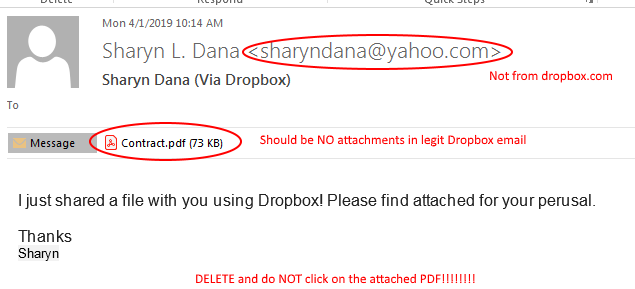
Be advised, we are seeing a huge influx of fake Dropbox notifications with malicious PDFs attached.

Remember:

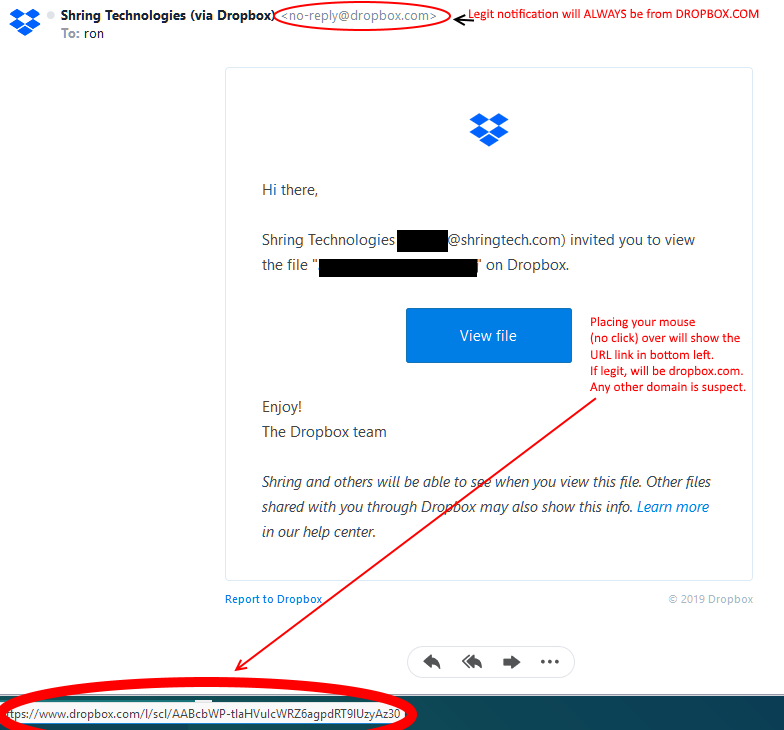
  • If it is not from noreply@dropbox.com, it is likely not legit.
  • Do NOT open a PDF attachment from any email address you do not know. Dropbox or not!
  • Dropbox shares do NOT attach a file to an email. Only link back to Dropbox will be provided. (see below)

Below are examples of legit and fake Dropbox notifications:

Legit Dropbox Notification:

Fake Malicious Dropbox Email:

After seeing a legit Dropbox email .. the above screams malicious. However, we get busy and often don’t take the time to actually look at the details. It is now imperative that you scrutinize ANY and ALL emails with attachments. No technology will prevent human overt-rides. I.E. you click on the link and open the PDF .. it is too late!

Be wary of any attachment from an email you are not familiar with.

Stay Diligent! Shring Support Services

Alert – Comcast/Xfinity Phishing Email Scam

Alert – Comcast/Xfinity Phishing Email Scam

Heads Up!

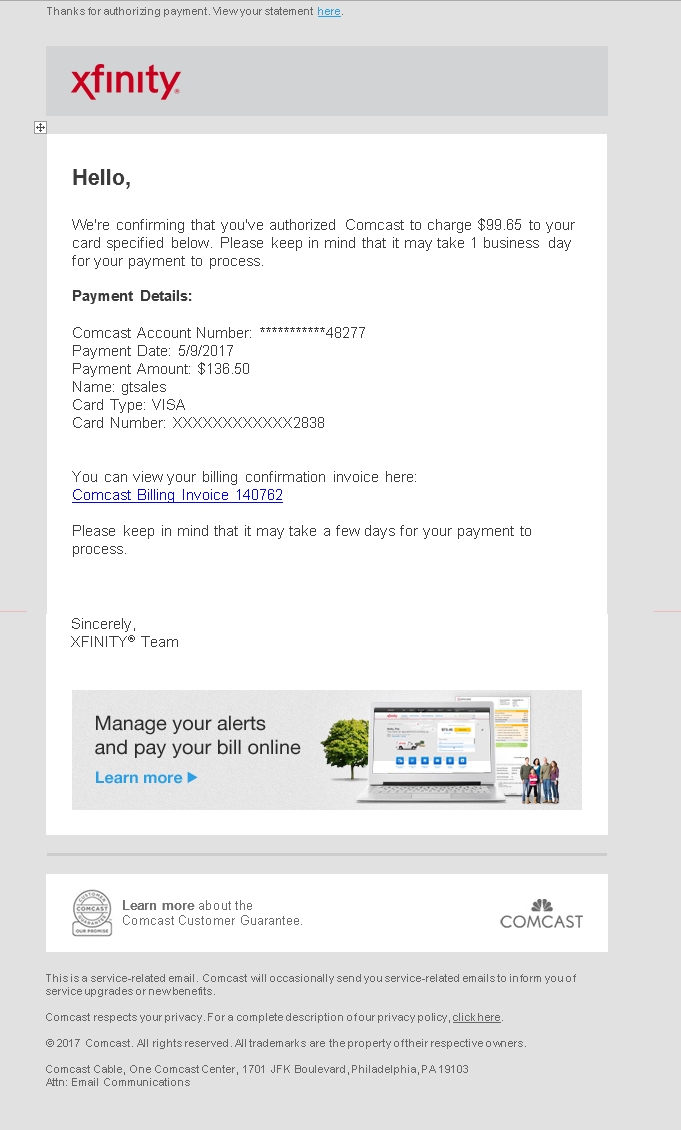
We are seeing a scary email attempting to pass through our ShringMail platform that is malicious and we wanted you to be aware of it as it is passing its way through the “interwebs”. It is being sent to both existing customers and others who are not even Comcast customers.

The email looks like this (more below image):

comcast scam1

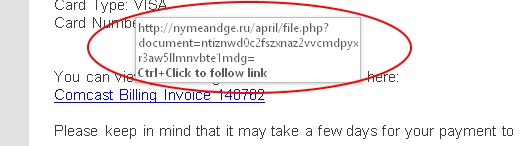
Looks legit right? However if you place your mouse over the link (DO NOT CLICK ON IT) you will see the actual URL you would be taken to. Obviously this is NOT a valid Comcast or Xfinity email address as shown below:

comcast scam2

Do not click on ANY links in the email. Delete it! Yes this is serious so an extreme awareness of this situation is critical.

If you have been caught by this scam and have not taken action to remediate this issue, please do not hesitate to contact the Shring Team as would be happy to assist in helping address the issue before major damage is done.

Contact Us Now


Digital “Spring Cleaning” Checklist

Digital “Spring Cleaning” Checklist

As Spring approaches, it’s time to take a few minutes and cleanup your “digital self” a good cleaning as well. While it certainly would be nice for this to be a once-a-year process, today your constant attention to what actions you take on the web. However, it is extremely important to take some time to “clean up” your devices and your approach to security.

Below you will find a list of things that will, not only keep your devices running smoothly, but also make great strides in helping protect your security and identity. While it’s probably not realistic to think you can do them all in one setting, we suspect you will find tasks listed here you never thought about.

CLEAN UP YOUR DEVICES

Make sure that all web-connected devices are squeaky clean.

  • Update software on all internet-connected devices to reduce risks from malware and infections.
  • Clean up your mobile life by deleting unused apps, keeping others current and reviewing app permissions.
  • Clear save browser cache from all browsers including Chrome, Firefox, Internet Explorer, MS Edge and even Opera.
  • Use third-party threat protection including on your mobile devices.

 STEP UP YOUR SECURITY PRACTICES

Reviewing the security of your online accounts is a must and a fast, simple way to be safer online.

  • Lock down your login: Your usernames and passphrases are no longer enough to protect key accounts like email, banking and social media. Strengthen online accounts and use strong authentication tools whenever offered.
  • Consider using “2FA” security – Two-Factor Authentication requires a second form of authorization and makes your account as secure as possible.
  • Secure your home router by making sure it has a strong passphrase and does not broadcast obvious identity information. And for god’s sake, update your router firmware. This is the #1 most common weakness in home networks.
  • Start using passphrases not passwords as we commonly know that the longer a password is, the harder it is exponentially to compromise. Use sentences easy for you to remember but aren’t obvious that are at least 12 characters long. Focus on positive phrases that you like to think about and are easy to remember.
  • Make unique passphrases for important accounts like email, finance and healthcare. You don’t use the same password/passphrase for everything do you? Of course not … no one would … right? SMH! (if you don’t know what SMH means, Google it!)
  • Step up security on your tablets and phones using at minimum a PIN lock but with biometrics becoming the norm on newer phones, you should be using finger-print, retina or facial recognition. Takes a little bit to get used to but will quickly become part of your process and protect the data on your mobile from access by “anyone”.
  • Use a password manager to manage the hoard of passwords and accounts we have today. We prefer LastPass.

 DIGITAL FILE PURGE AND PROTECTION

  • Backups, Backups, Backups are obviously important but also remove, delete or purge old copies of backups that are no longer valid/current.
  • Clean out your old email and empty deleted folders (permanent). If you need to keep old messages, move them to an archive file. This will also greatly improve the performance of your email client.
  • Unsubscribe to newsletters, email alerts and updates you no longer read. This will help you identify malicious email from legit.
  • Update online relationships by reviewing friends on social networks and all contacts lists to make sure everyone still belongs. Pay attention to new friends and profiles you may not recall.
  • Revisit what you shared online to remove things that may not be current or appropriate to where you are in life. Of course, as the saying goes, “once it’s out there it’s OUT there”, it’s still appropriate to remove unwanted postings.
  • Copy/download important data to multiple secure locations/media and keep in a fire-protected safe where it can be safely stored.
  • Password protect back-up drives and keep them in a different location off the network.
  • Encrypt laptop hard drives to ensure your data is safe should your laptop be lost or stolen. All operating systems now include some form of drive encryption such as Windows BitDefender, for example.
  • Be sure to properly dispose of sensitive materials – such as hard drives and memory cards, The trach can is no place for this type of media. Well not without a hammer taken to them. The more responsible handling includes having a 3rd party destruction service handle it. But the hammer is much more fun. Wear safety glasses!

 CLEAN UP YOUR ONLINE REPUTATION

  • Own your online presence by reviewing the privacy and security settings on social networks you use being sure they are set at your comfort level for sharing. Enlight of the news we are smothered with about lack of privacy, you will be surprised what privacy settings your social network now offers.
  • Clean up your social media presence by deleting old photos, etc. that no longer represent who you are.
  • Update your “personal information” by reviewing your personal information and updating it where needed. Make sure your online reputation shines.
  • Consider using a separate email account for online/social accounts. This will help with spam and unwanted emails as well.

 MITIGATE THE DAMAGE

Has your info been part of a major data breach? It is likely! Check for compromised accounts

Visit HaveIBeenPwned to check whether any of your personal accounts have been included in the major data breaches.

havibeenpwned